


How to Buy USDT in India: 2026 Guide
2026-11-24
You can buy Tether (USDT) in India directly in Bitget Wallet using UPI. The USDT is sent to your
self-custodial wallet after the payment is completed.
Before you pay, check the provider and the exact amount of USDT you will receive. This guide shows the steps, explains local verification requirements, and explains what you can do with the USDT once it arrives.
Key takeaways
-
Buy USDT with INR using UPI directly in Bitget Wallet.
-
Compare partners such as Onmeta and AlchemyPay — the amount of USDT can differ.
-
Most purchases complete within a few minutes.
-
Once the USDT arrives, you can trade it, earn on it, send it, or spend it in the same wallet.
How Does Buying USDT with INR Work?
Bitget Wallet connects to licensed payment partners so you can buy USDT with Indian Rupees
(INR). You select the amount, choose a provider, complete standard KYC verification if required, and pay with UPI. The USDT is then delivered to your wallet.
You do not need to buy on an exchange first and then withdraw. The purchase happens inside the wallet, and you control the funds once they arrive.
How to buy USDT in India on Bitget Wallet
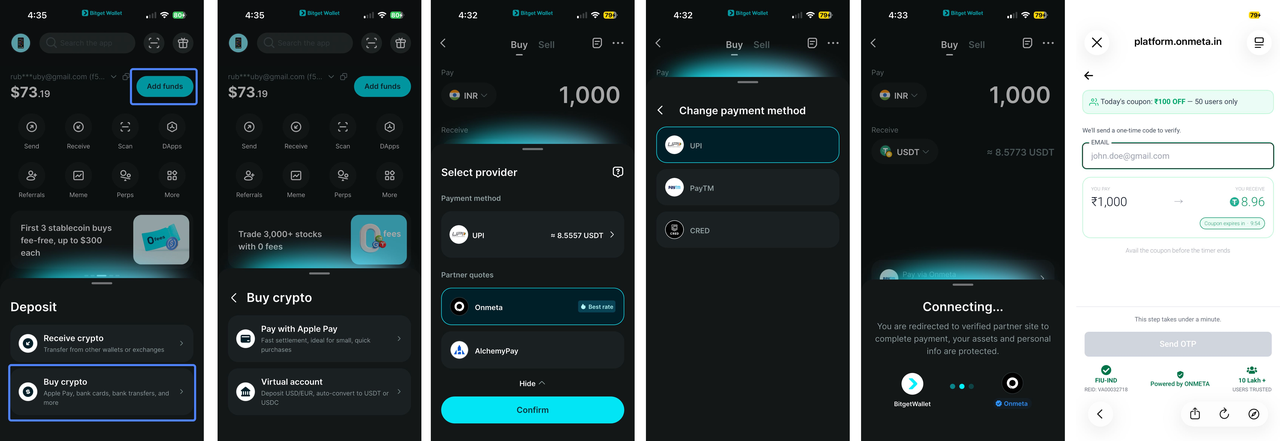
1. Open the app and go to Buy crypto
On the Bitget Wallet homepage, tap
Add funds. Then select
Buy crypto.
2. Enter the amount
Select
INR and enter the amount you want to spend. Then select
USDT. The app shows an estimated amount of USDT based on the current rate.
3. Choose a payment provider
Review the available providers. UPI is commonly listed. Onmeta and AlchemyPay may both appear. One is often marked as the best rate. Switch between them to see how much USDT each offers for the same INR amount.
Select the one that gives you more USDT and tap
Confirm.
4. Complete the payment
You are redirected to the partner’s site. Follow the steps to enter your email and complete any verification. Then pay with UPI. Before confirming, check the INR amount and the USDT you will receive.
5. Check your wallet
After the payment succeeds, return to Bitget Wallet. The USDT should appear in your balance. You can also view the transaction under
Wallet > History.
Supported Payment Methods & Partners for INR to USDT
When buying USDT, you will usually see UPI as the payment method. You may also see more than one partner, such as Onmeta and AlchemyPay.
The main difference is the amount of USDT you receive for the same INR amount. One partner may offer a slightly better rate. Processing time can also vary.
Before confirming, compare the final USDT amount for each option and choose the higher one.
| Payment Option | Type | Typical KYC Needed | Best For |
| UPI | Payment Method | Depends on partner | Fast, low-friction INR bank transfers |
| Onmeta | Licensed Partner | PAN + Aadhaar / Selfie | Local Indian UPI routing and fast INR settlement |
| AlchemyPay | Licensed Partner | Basic ID verification | Competitive exchange rates on larger INR orders |
Focus on how much USDT you will actually receive rather than the partner name.
What You Can Do with USDT in Bitget Wallet
After the USDT arrives, you can trade it, earn on it, spend it, or send it from the same wallet.
Trade Crypto & Tokenized Assets
You can swap USDT for other assets in the app, including:
-
Cryptocurrencies
-
Tokenized stocks, ETFs, and commodities (3,000+)
-
Perpetual contracts (900+ pairs)
-
Tokenized gold and other real-world assets
Bitget Wallet supports over 1 million tokens across 130+ blockchains. Cross-chain swaps are available, and
gas fees are covered on eligible transactions.
Earn yield on your USDT
If you plan to hold USDT, you can earn yield on it. Rates typically range from 2% to 10% APY, depending on the product.
To start:
-
Open Bitget Wallet.
-
Go to the Earn section.
-
Select a stablecoin product.
-
Enter the amount and confirm.
The funds stay in your wallet. Check the current rate and withdrawal rules in the app before depositing, as they can change.
Send USDT Across Networks
Transfer USDT to another wallet or exchange. Supported networks include Tron (TRC20) for low-fee transfers. You can also send funds using a shareable link.
You stay in control
Bitget Wallet is self-custodial. You control the private keys. New users can create a wallet with a Google account, Apple ID, or email.
No seed phrase is required at the start.
4 Essential Tips for Buying Tether (USDT) in India
-
Compare the USDT amount across providers before confirming.
-
Start with a smaller amount the first time to test your bank's UPI limit and settlement speed.
-
Have your UPI app and PAN details ready before you begin.
-
Check the network (such as TRC20 vs. ERC20) if you plan to send the USDT later.
Frequently Asked Questions
Can I buy USDT with UPI in India?
Yes. Bitget Wallet supports UPI through verified fiat on-ramp partners.
How long does it take to receive USDT?
Most purchases complete within a few minutes after the UPI payment succeeds.
Do I need to complete KYC?
Yes, most Indian INR partners require quick identity verification (such as PAN and Aadhaar) to comply with local regulations. You will be prompted on the partner site if needed.
Is Bitget Wallet self-custodial?
Yes. You control the private keys. Bitget Wallet does not hold your funds.
What if the payment fails?
Check whether the UPI payment went through in your banking app. If money was deducted but USDT did not arrive, contact support in the app with your transaction details.
Start Buying USDT with INR Today
Open Bitget Wallet, tap Add funds, and select Buy crypto to purchase USDT with INR. Once it arrives, you can trade, earn, send, or spend from the same self-custodial wallet.
Table of contents
Recommended
- What Is USDGO? How to Stake USDGO on Bitget Wallet?2026-11-24 | 5 mins
- TRC20 vs ERC20: Which USDT Network Is Cheaper & Faster? (2026)2026-11-23 | 5 mins
- How to Send USDT on Tron (TRC20): Step-by-Step Guide (2026)2026-11-23 | 5 mins



