


How to Pay for Meta Ads with USDT (Facebook & Instagram Guide)
2026-10-30
If you run paid social campaigns and hold your advertising budget in crypto, Meta Ads Manager won't let you settle campaign invoices straight from a Web3 wallet. Linking a
Bitget Wallet Card solves this: you fund the card with your crypto balance—such as Tether (USDT), USDC, ETH, or other supported assets—and Meta charges the card through standard debit rails. That keeps your Facebook and Instagram campaigns scaling without manual payment roadblocks, while earning you up to
3% Assetback along the way.
Can You Pay for Meta Ads with USDT?
Yes, by using a crypto debit card as a bridge. Meta Ads Manager does not support direct on-chain wallet transactions, but it accepts standard debit cards. Using a Bitget Wallet Card lets you fund Facebook and Instagram campaigns from your crypto balance while Meta processes transactions over everyday card networks.
| Billing Feature | Direct USDT Wallet Transfer | Bitget Wallet Card |
| Accepted by Meta Ads? | No | Yes |
| Payment Network | Blockchain (TRC-20, ERC-20, etc.) | Standard debit card network |
| Settlement Method | Direct wallet-to-wallet transfer | Debit card settles against crypto balance |
How the Transaction Flow Works
-
Step 1: Hold USDT (or other supported crypto like USDC) in your Bitget Wallet.
-
Step 2: Top up your Bitget Wallet Card using your crypto balance.
-
Step 3: Meta Ads charges your card automatically whenever your account hits its billing threshold.
How Meta Ads Billing Differs from Other Platforms
Managing crypto-funded ad spend on Meta requires understanding its specific billing structure:
-
Postpay Billing Thresholds: Meta automatically charges your payment method once your ad costs hit a set dollar amount. New accounts often start at a low threshold (such as $25), which increases automatically ($50, $100, $250, and beyond) as previous charges clear successfully.
-
Admin Permissions Requirement: You must have Admin rights in Meta Ads Manager to add or change a payment method.Standard "Advertiser" or "Analyst" permissions will not display card management options.
-
Prepaid vs. Debit Cards: Meta's risk filters frequently decline reloadable prepaid cards for automatic billing. Because the Bitget Wallet Card runs on genuine debit card rails, it passes Meta's fraud checks and processes threshold charges normally.
3 Simple Steps to Pay for Meta Ads with a Bitget Wallet Card
Follow these steps to prepare your card and link it to Meta Ads Manager.
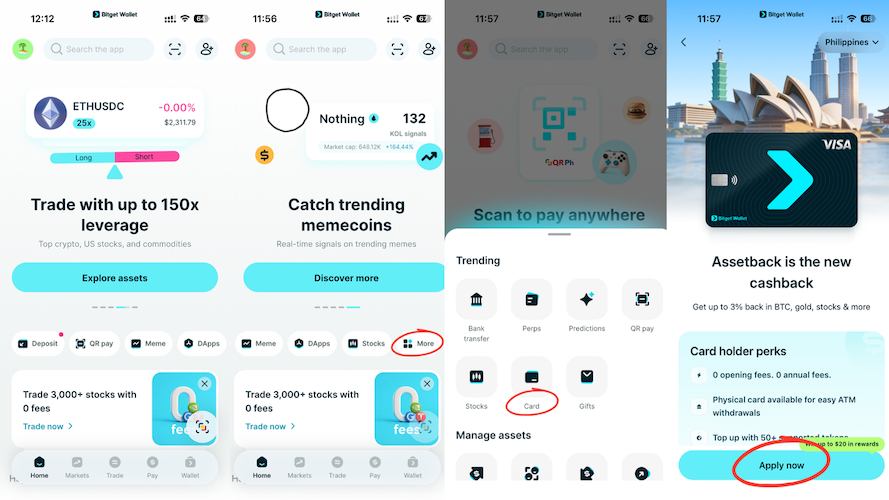
Step 1: Apply for Your Bitget Wallet Card
-
Open the Bitget Wallet app and navigate to the Card tab.
-
Check card availability in your region and tap Apply.
-
Complete the standard identity check (KYC).
-
Once verified, your virtual card details (16-digit card number, expiry date, and CVV) will appear inside the app.
For full regional requirements and verification steps, review the complete guide on
how to apply for the Bitget Wallet Card.
Step 2: Top Up Your Card with Crypto
-
In the Card tab of Bitget Wallet, tap Top Up.
-
Select USDT (or another supported token like USDC) as your deposit currency.
-
Choose your preferred network (such as Arbitrum, BNB Chain, or TRC-20) to keep network transfer fees low.
-
Enter your desired top-up amount, review the conversion details, and confirm the transaction.
Tip: Because Meta charges dynamically as your ads spend throughout the day, always keep a buffer on your card above your daily budget to prevent threshold declines.
Need step-by-step deposit instructions? Follow this tutorial on
how to top up your crypto debit card with USDT.
Step 3: Add the Card to Meta Ads Manager
-
Log in to Meta Ads Manager.
-
Open the All tools menu on the left side and select Billing & payments (or Payment settings).
-
Click Add payment method.
-
Choose Debit or credit card, enter your Bitget Wallet Card details, and save.
-
Set the card as your Primary payment method.
Tips for Managing Meta Ad Budgets with Crypto
-
Watch Mid-Campaign Threshold Charges: Unlike platforms that bill strictly once a month, Meta charges your card every time your balance crosses your current threshold. If you are scaling campaigns rapidly, your card may be billed multiple times in a single week. Keep enough USDT loaded on your Bitget card to cover peak ad spikes.
-
Avoid Payment Interruptions to Protect Ad Learning: If a threshold charge fails because your card runs out of funds, Meta immediately freezes your active ad sets. Restarting paused ads can reset Meta's delivery learning phase, increasing cost-per-acquisition (CPA). Maintaining an adequate card balance ensures your campaigns run uninterrupted.
Earn Up to 3% Assetback on Meta Ads Spend
Using the Bitget Wallet Card allows performance marketers to turn everyday traffic costs into asset reserves:
-
Base Rate: Earn 2% back on everyday ad spend and business purchases.
-
Booster Tier: Earn up to 3% back by meeting monthly volume criteria or new-user qualification levels.
Instead of expiring points or restricted platform credits, Assetback rewards you in tangible digital and financial assets:
-
Cryptocurrency: Bitcoin (BTC), USDC
-
Commodities: Tokenized Gold (XAUT)
-
Tokenized Equities & ETFs: S&P 500 ETF, NVIDIA, Tesla, Google
For full reward terms, monthly caps, and tier rules, read the
Bitget Wallet Card Assetback guide.
Frequently Asked Questions
Can I pay for Facebook and Instagram Ads directly from a Web3 wallet?
No. Meta Ads Manager does not have a native crypto wallet connection. You need to route payments through an accepted debit card like the Bitget Wallet Card to spend your USDT reserves on ads.
What happens if Meta declines an automatic threshold charge?
If your Bitget Wallet Card balance is too low to cover a billing threshold, Meta will pause your campaigns immediately. Once you add USDT to your card, you can manually trigger payment by clicking "Pay Now" in Meta's Billing dashboard to resume your ads.
Can I use the same Bitget Wallet Card across multiple ad accounts?
Yes. You can add your Bitget Wallet Card across multiple Meta ad accounts or use it across other major networks like Google and TikTok, provided your total card balance covers the combined spend.
Risk disclosure
Please be aware that cryptocurrency trading involves high market risk. Bitget Wallet is not responsible for any trading losses incurred. Always perform your own research and trade responsibly.
Table of contents

Recommended
 How to Pay for TikTok Ads with USDT Card2026-10-30 | 5 mins
 How to Apply for a Crypto Mastercard2026-01-05 | 5 mins
 How to Apply for a Crypto Visa Card and Start Spending Crypto Worldwide2026-01-02 | 5 mins



