


How to Buy USDT with a Credit Card: Step-by-Step Guide
Buying USDT (Tether) with a credit card is one of the fastest ways to add stablecoins directly to your crypto wallet without first moving money from a bank account. In Bitget Wallet you can buy USDT with a credit card, debit card, Apple Pay, or other local methods in just a few minutes and receive the tokens straight into your self-custodial wallet.
This updated guide shows you exactly how to buy USDT with a credit card on Bitget Wallet, what fees to expect, how to avoid common payment failures, which network to choose, and what you can do with the USDT once it arrives.

Key takeaways
- Buy USDT with a credit card directly inside Bitget Wallet using the “Buy crypto” flow.
- Bitget Wallet supports USDT on 19 networks, including Tron (TRC20), Ethereum, BNB Chain, Solana, Base, Morph, and more.
- Credit card purchases require identity verification (passport or ID).
- Fees, available cards, and providers vary by region — always check the final quote before confirming.
- After purchase you can hold, swap, send, spend with the Bitget Wallet Card, or use related Earn products.
Why Buy USDT with a Credit Card?
A credit card (or debit card) lets you purchase USDT through a fiat on-ramp without depositing fiat to an exchange first. Bitget Wallet is self-custodial, so the USDT arrives under your control rather than on a third-party platform. Depending on your country you may also see Apple Pay, Google Pay, bank transfers, or local payment methods.
How to Buy USDT with a Credit Card on Bitget Wallet
1. Choose USDT and enter your purchase amount
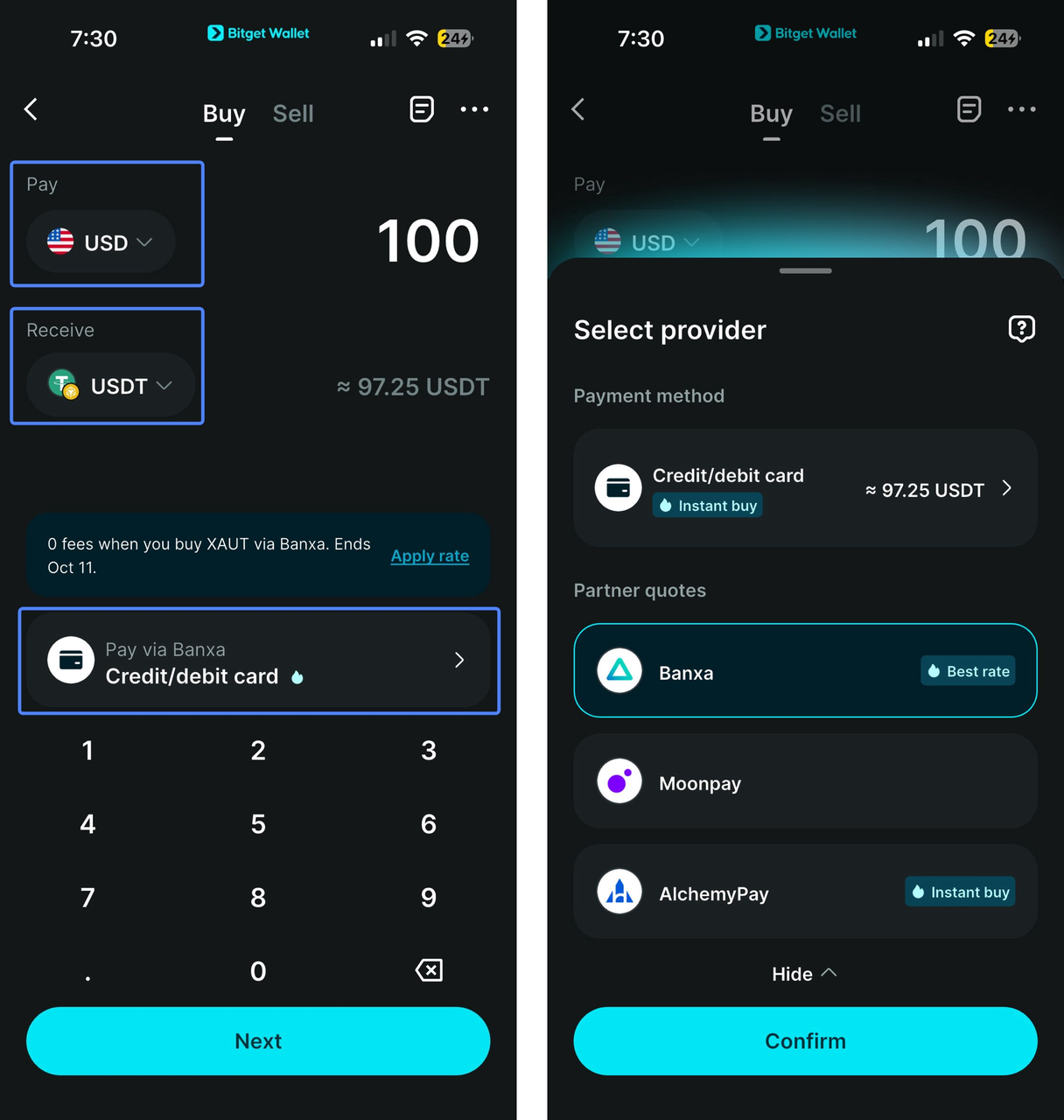
2. Choose a payment method and review the purchase
3. Complete verification and payment
Fees When Buying USDT with a Credit Card
The total cost usually includes:
- Payment provider / processing fee
- Spread (built into the quoted rate)
- Possible card-issuer fees (some banks treat crypto purchases as cash advances)
- Network fee (often very low or zero on Tron/TRC20 and BNB Chain)
Typical card on-ramp fees in 2026 range from roughly 2% to 5% depending on the provider, region, card type, and amount. Bank transfers are usually cheaper but slower. Always use the final quote shown in Bitget Wallet — it is the most accurate figure for your transaction.
Tip: Start with a small test amount the first time so you can confirm the exact fees and arrival time for your region and card.
Comparison: Credit Card vs Other Ways to Buy USDT
| Method | Speed | Cost | Best For | Notes |
| Credit / Debit Card | Minutes | 2–5% | Instant access | Requires KYC; check cash-advance risk |
| Apple Pay / Google Pay | Minutes | 2–5% | Mobile convenience | Availability varies by region |
| Bank Transfer | Hours–1–3 days | 0.5–2% | Larger amounts, lower fees | Slower |
| P2P | Minutes–hours | Often lowest | Restricted regions | Extra caution needed |
Bitget Wallet shows the options available to you and automatically highlights the best rate among providers.
What to Check Before Buying USDT
USDT network
Final payment amount
Payment provider
Card details
Verification
Can I Buy USDT on TRC20 with a Credit Card?
Yes. During the “Buy crypto” flow you can select the Tron (TRC20) network if it is available for your region and provider. Before sending the USDT to another wallet or exchange, confirm that the receiving side also supports USDT on TRC20. Sending on the wrong network can result in permanent loss of funds.
What You Can Do With USDT After Buying It
- Spend it — Top up the Bitget Wallet Card and use it at Visa/Mastercard merchants or via Apple Pay/Google Pay (availability varies). Eligible users can earn Assetback rewards.
- Swap or trade — Exchange USDT for other assets directly in Bitget Wallet.
- Send it — Transfer to another wallet or platform (always double-check the network).
- Earn — Swap to a supported stablecoin (e.g. USDC) and explore Stablecoin Earn options (rates and risks vary).
- Hold in self-custody — You control the keys. Bitget Wallet also maintains a $300 million Protection Fund for platform-related issues.
FAQs
Can I buy USDT with a credit card?
How do I buy USDT with a credit card?
Can I buy USDT with a debit card?
Can I buy USDT with a credit card without verification?
Can I buy USDT on TRC20 with a credit card?

 How to Pay for Google Ads with USDT (Step-by-Step Guide)2026-10-30 | 5 mins
 How to Pay for Meta Ads with USDT (Facebook & Instagram Guide)2026-10-30 | 5 mins
 How to Pay for TikTok Ads with USDT Card2026-10-30 | 5 mins



